Bring your own website, or request a basic one-page build for $50 once. Hosting and domains are separate. Online hosting orders are currently unavailable. Ask us to confirm availability before moving your website.
A focused one-page website for a small business that needs a professional place to start. Already have a site? Skip the build and choose hosting only.
What you get
One mobile-friendly page with business, services, and contact sections. Your colors and supplied logo, basic page SEO, and one consolidated revision round.
What you provide
Your approved business details, text, logo, and photos you have permission to use. We confirm the page content and delivery schedule before payment.
What costs extra
Your selected hosting plan and domain. Additional pages, copywriting, ongoing edits, booking, ecommerce, and AI integrations are separate.
What does basic SEO include?
A descriptive page title and meta description, clear headings, meaningful image descriptions, and checks that the launched page can be indexed. This is initial page setup, not ongoing SEO or a ranking guarantee.
$50 USD is the one-time website build charge, not the full checkout total. Hosting recurs at the selected plan's disclosed rate. Availability and the full written total are confirmed before payment. Larger portfolio examples show separate projects, not everything included in this offer.
The HostAvvy Control Center keeps service status, exact limits, renewal details, domains, invoices, and support together. Protected shortcuts open the native cPanel tool for the task.
Included
The resources and care listed with the selected plan.
Available in cPanel
Self-service hosting tools available after activation.
Requires setup
Domains, mailboxes, applications, and content configured for the account.
HostAvvy Control CenterIllustrative account view
Service statusRecorded by WHMCSVerified active
WebsitesExact plan limit
StorageExact plan limit
BandwidthExact plan limit
MailboxesExact plan limit
File Manager Email Domains SSL Status
Renewal details stay visible before the due date.
Honest limitsNo unlimited-resource bait.
Direct controlNative cPanel tools remain accessible.
Careful changesIncluded and separately scoped work stay distinct.
One account recordService, billing, and support history stay connected.
Launch-Ready Hosting
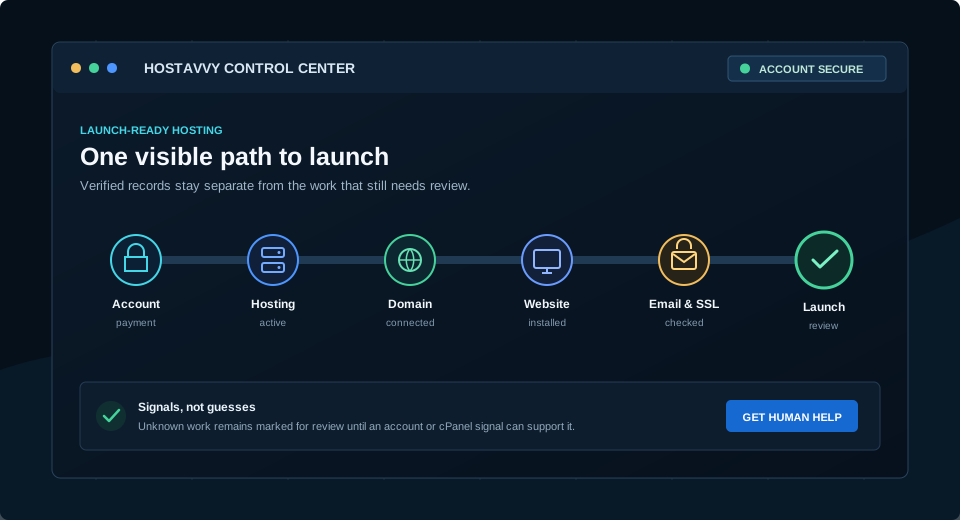
The Control Center keeps setup moving after checkout.
A visible path from account and payment through hosting, domain, website, email, SSL, and a final launch review.
Every verified state is tied to an account, invoice, service, domain, or signed-in cPanel signal.
01
Account & PaymentYour account, invoice, billing term, and payment stay visible in WHMCS.
02
Hosting ActiveYour selected limits and service state come directly from the hosting record.
03
Domain ConnectedRegister, transfer, or use an existing domain through the native order path.
04
Website Installed or MigratedUse native site tools or request scoped migration help when the account is active.
05
Email & SSL CheckedMailbox and certificate signals are reviewed in cPanel, never assumed from a plan list.
06
Launch ReviewA final checklist keeps the technical setup and the customer handoff together.
What a Hosting Plan Must Cover
The plan should work after payment, not only look good on a pricing page.
HostAvvy checks the service around the hosting account so ordering, setup, support, renewal, and cancellation do not become disconnected experiences.
Clear resources
Storage, bandwidth, websites, email, account tools, availability, and renewal terms are shown before the order.
Clear billing choices
Compare monthly and annual charges, renewal terms, and separate domain costs. The availability shown with each plan determines whether ordering is open.
One account history
Use your account for service records, invoices, and support. cPanel tools appear only for active hosting records with an assigned server and account.
Keep the Project Moving
Plan the website, domain, email, migration, and hosting needs together.
HostAvvy can define the complete foundation now and confirm the appropriate hosting path before work begins.