

Tampa Bay Home-Service Website Benchmark 2026
Use an anonymized 25-site review to see which website basics are common and where practical gaps still appear.
HostAvvy reviewed the public homepages of 25 Tampa Bay home-service businesses across roofing, painting, remodeling, landscaping, fencing, handyman, plumbing, and HVAC searches. The review records observable website signals, not business quality or marketing performance. The sample is directional, not a census, and no company is ranked or identified in the findings.
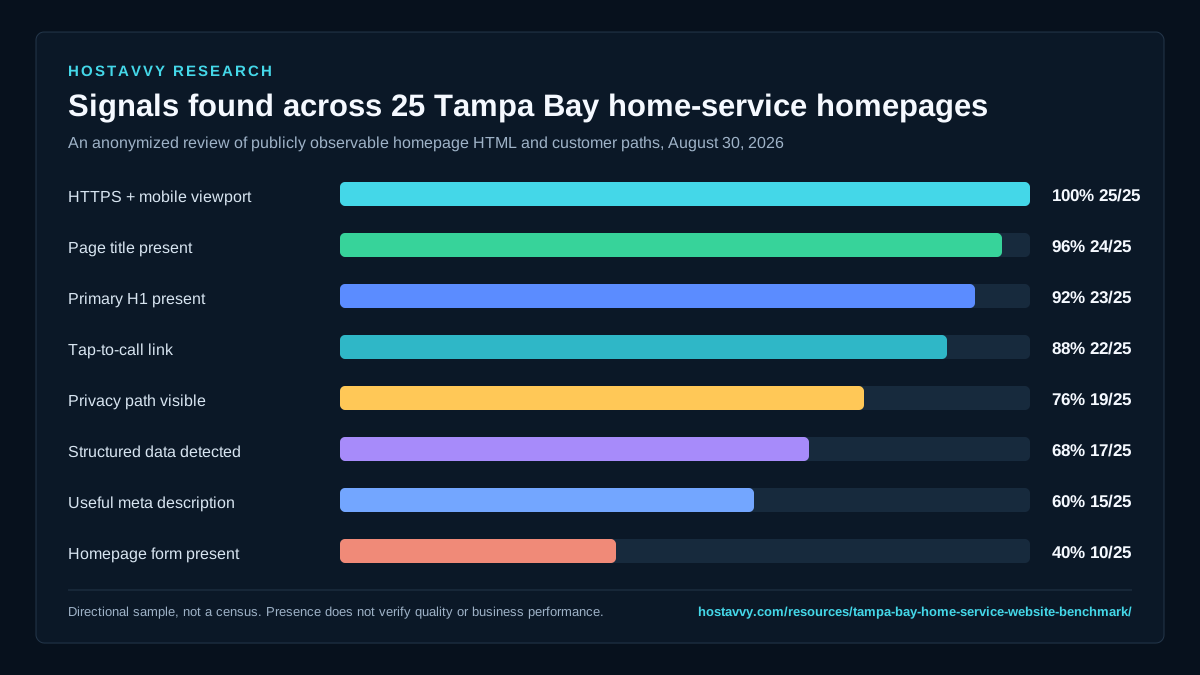
25 public homepages, reviewed August 30, 2026
Public homepage HTML and visible customer paths. Percentages show whether an observable signal appeared on the reviewed homepage. They do not prove that a form, claim, tracking setup, or structured-data implementation works correctly.
Every reviewed homepage used HTTPS and declared a mobile viewport.
Nearly every homepage exposed a readable HTML title.
Most pages included at least one primary heading in the returned HTML.
Most sites made a telephone number directly tappable.
A visible privacy reference appeared on roughly three quarters of the homepages.
JSON-LD was present, but the review did not judge its accuracy or completeness.
Only three in five pages returned a description of at least 40 characters.
Many businesses relied on calls or a separate contact path instead of an embedded form.
Review the methodology and limits
- The sample was assembled from public Tampa Bay searches for active home-service categories and deduplicated by company website.
- Only publicly returned homepage HTML was measured. Login areas, private analytics, ad accounts, CRM records, rankings, revenue, and lead quality were not reviewed.
- Signals were binary and conservative: present or not detected. A detected signal is not an endorsement of its implementation.
- The discovery sample was not weighted by trade or company size, so percentages should guide questions rather than represent the whole Tampa Bay market.
HostAvvy. "Tampa Bay Home-Service Website Benchmark 2026." Reviewed August 31, 2026. https://hostavvy.com/resources/tampa-bay-home-service-website-benchmark/
Link to the canonical benchmark page so readers can review the methodology and limits.What this benchmark actually measures
The review focuses on foundational signals a prospective customer or search crawler can encounter on a public homepage: secure delivery, mobile setup, a page title, a primary heading, a useful description, a tappable phone path, a form, local service context, visible proof language, privacy access, and structured data.
It does not grade design taste, verify licenses, test every form submission, measure rankings, or claim that one pattern produces more leads. A technically present feature can still be confusing or broken. The benchmark is a starting point for a manual review, not a score assigned to another business.
Public evidence only
The review uses information available to an ordinary visitor without accounts, private tools, or customer data.
Anonymized findings
No company is named, ranked, criticized, or used to imply a result it did not authorize.
Directional sample
The findings help owners ask better questions but do not represent every Tampa Bay service business.
Mobile basics are now the minimum
All 25 reviewed sites used HTTPS and declared a mobile viewport. That is encouraging, but it also means those features no longer separate a business. The meaningful question is whether the first mobile screen quickly explains the service, location, proof, and next action without hiding them behind a busy header or oversized promotion.
A mobile-ready tag does not prevent clipped navigation, slow images, tiny controls, intrusive overlays, or a contact form that is painful to complete. Review the full path from search result to call or confirmation on a real phone, not only a desktop preview set to a narrow width.
First-screen clarity
State the service, customer fit, real geography, and primary action before secondary detail.
Tap quality
Make calls and buttons easy to use without accidental taps, hidden labels, or competing sticky controls.
Complete journey
Test call, form, validation, confirmation, routing, reply, and fallback behavior on mobile.
Search snippets and trust controls still vary
Only 60 percent of the reviewed pages returned a useful-length meta description, and 68 percent exposed JSON-LD. Search engines may write their own snippets, but accurate titles, descriptions, headings, internal links, and structured data give them clearer source material. Structured data should match visible facts rather than add claims visitors cannot verify.
Privacy references appeared on 76 percent of the homepages. A policy link alone is not a complete privacy program, but a missing path creates unnecessary uncertainty when forms, analytics, call tracking, chat, or advertising tools collect information. Business identity, policies, credentials, and proof should be easy to inspect before an inquiry.
Snippet source
Write a specific title and description for the customer question each important page answers.
Accurate schema
Describe only visible, supported business facts and keep structured data aligned with the page.
Trust access
Make company identity, contact details, privacy, terms, proof, and relevant credentials easy to reach.
A form is useful only when the response path works
Ten of the 25 homepages included a form in the returned HTML, while 22 provided a tap-to-call link. That difference is not automatically a defect. Some customers prefer to call, and some businesses intentionally place qualification on a dedicated page. The risk is presenting an action without a reliable owner, confirmation, delivery path, or after-hours expectation.
Use the companion 100-point scorecard to review the complete operating path. Fix blockers that prevent contact or create false expectations before adding more pages, widgets, tracking scripts, or automation.
Choose the right action
Match call, short form, detailed estimate, or booking to the customer decision and team capacity.
Name the owner
Document where each inquiry goes, who accepts it, and what happens when the first route fails.
Set honest expectations
Confirm receipt and explain the real next step without inventing an instant-response promise.
Use this before the next decision.
- Test the first mobile screen on a real phone
- Confirm service and service area are immediately clear
- Verify the primary call or form path end to end
- Write a unique title and useful meta description
- Keep one clear primary H1
- Link privacy and company information visibly
- Validate structured data against visible facts
- Review the site again after major business or provider changes
Related guides
Score your own website against the same practical questions.
The 100-point HostAvvy scorecard turns the benchmark into a private, browser-based review. No answers are sent or stored.